


Exporting from Search Console. Uploading the CSV to the AI. Asking the question. Realizing you need to cross-reference with GA4 data. Exporting again. Uploading again. Rephrasing the question because the AI lost the context of the previous conversation. If this cycle sounds familiar, you're already experiencing the problem this article solves.
Most SEO professionals using AI today are stuck in this manual flow, and there's nothing wrong with it as a starting point. The issue arises when this cycle is treated as the ceiling of what AI can achieve, when it's merely the first step.
What Does Claude Do Better Than ChatGPT for SEO?
There's no absolute answer here, and any comparison promising one is oversimplifying. What exists are different strengths for different tasks:
| Claude | ChatGPT |
|---|---|
| Excels with long documents and large spreadsheets | Great for quick brainstorming |
| Maintains context longer within the same conversation | Agile responses to specific questions |
| Consistent in audits and data cross-referencing | Strong in creative content generation |
| Technical documentation and structured reasoning | Ideation and angle exploration |
For SEO professionals, the most impactful difference in daily work is the first line of that table. A simple Search Console audit can involve thousands of rows, and the ability to keep this volume of data in context without losing the thread of analysis is what separates a productive session from one that requires starting from scratch with every new question.
Scenario 1: The Manual Workflow (Where Most Are Today)
 Before any integration, there's a way to get much more out of Claude just by better organizing what you already export.
Organize your exports before uploading. Separate files by type: search performance, pages, queries, device. Smaller, more specific files lead to more precise analyses than a generic spreadsheet with everything mixed together.
Structure your prompt to maintain context. Instead of asking an isolated question, describe the entire session's objective at the outset: "I will provide you with Search Console data from the last 90 days. I want to identify opportunities for CTR, cannibalization, and declining pages. I will ask several questions about this same dataset." This prevents you from needing to re-explain the context with each new question.
Some prompts that work well in this manual flow, ready for adaptation:
- "Analyze this Search Console data and identify pages with high impressions and low CTR, ordered by potential gain."
- "Find potential cannibalization among these URLs, considering queries that appear on more than one page."
- "Suggest internal linking opportunities considering this sitemap and the content of the titles."
- "Compare this period with the previous one and point out patterns in the pages that grew or declined the most."
The gain from this workflow is already tangible: less time spent on dynamic spreadsheets, more time interpreting what the data says. The limitation is also real: every time the data changes, the export and upload cycle restarts.
Claude Code for Technical SEO Tasks
There's a layer beyond conversational analysis that most SEO analysts haven't yet explored: using Claude Code for technical tasks that currently depend on another person or tool. Reviewing a robots.txt line by line, analyzing server logs for pages Googlebot is unnecessarily crawling, generating a script that automatically cross-references two reports, reviewing schema markup implementation directly in the source code. These are tasks that require working with a codebase, not just loose text, and this is precisely the scenario where Claude Code delivers value that a common chat interface does not.
Get the next articles by email
New content from Draivv, straight to your inbox. No spam.
The Complete Workflow, Visualized
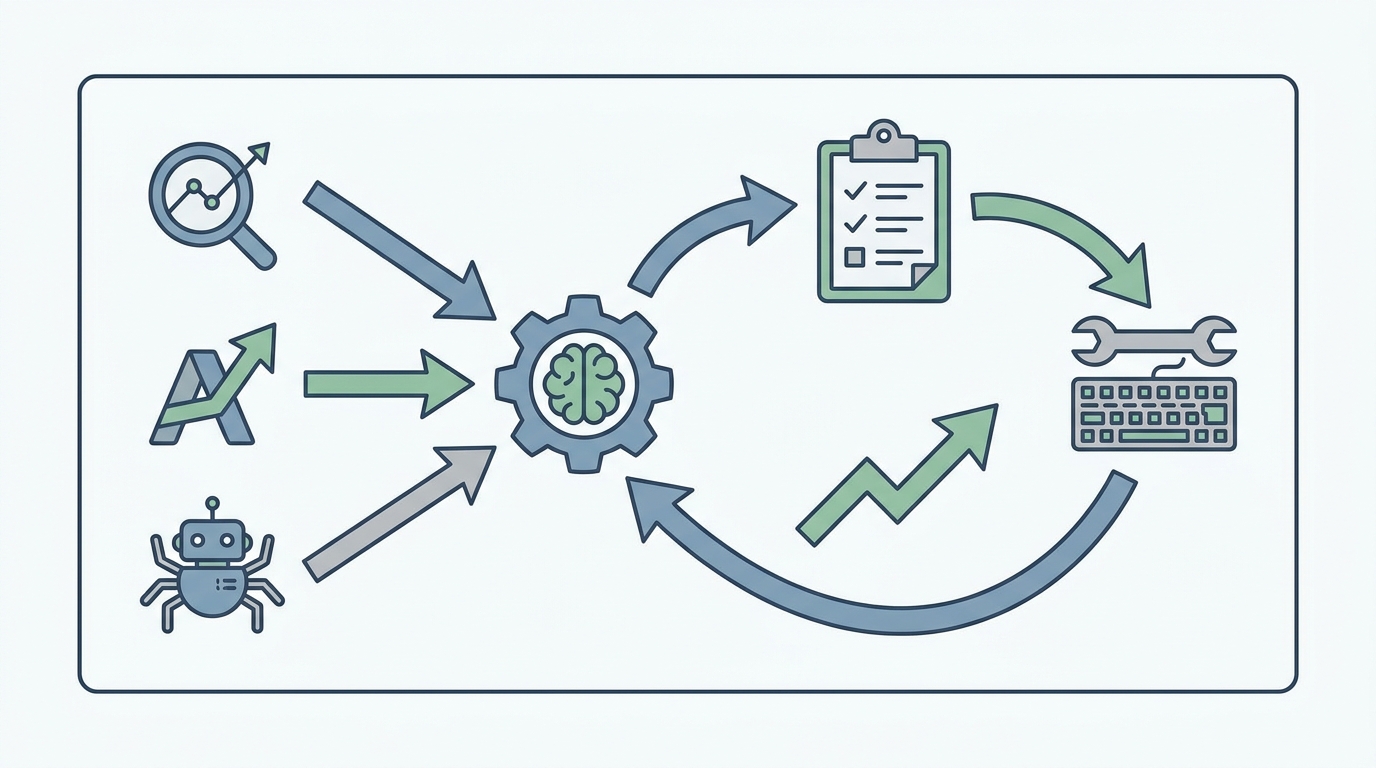
Search Console, GA4, and a crawler feed the analysis. The analysis generates an action plan. The action plan becomes implementation. And the result of the implementation feeds back into the next round of analysis. It's a cycle, not a task that ends after one answer.
Scenario 2: The Connected Workflow
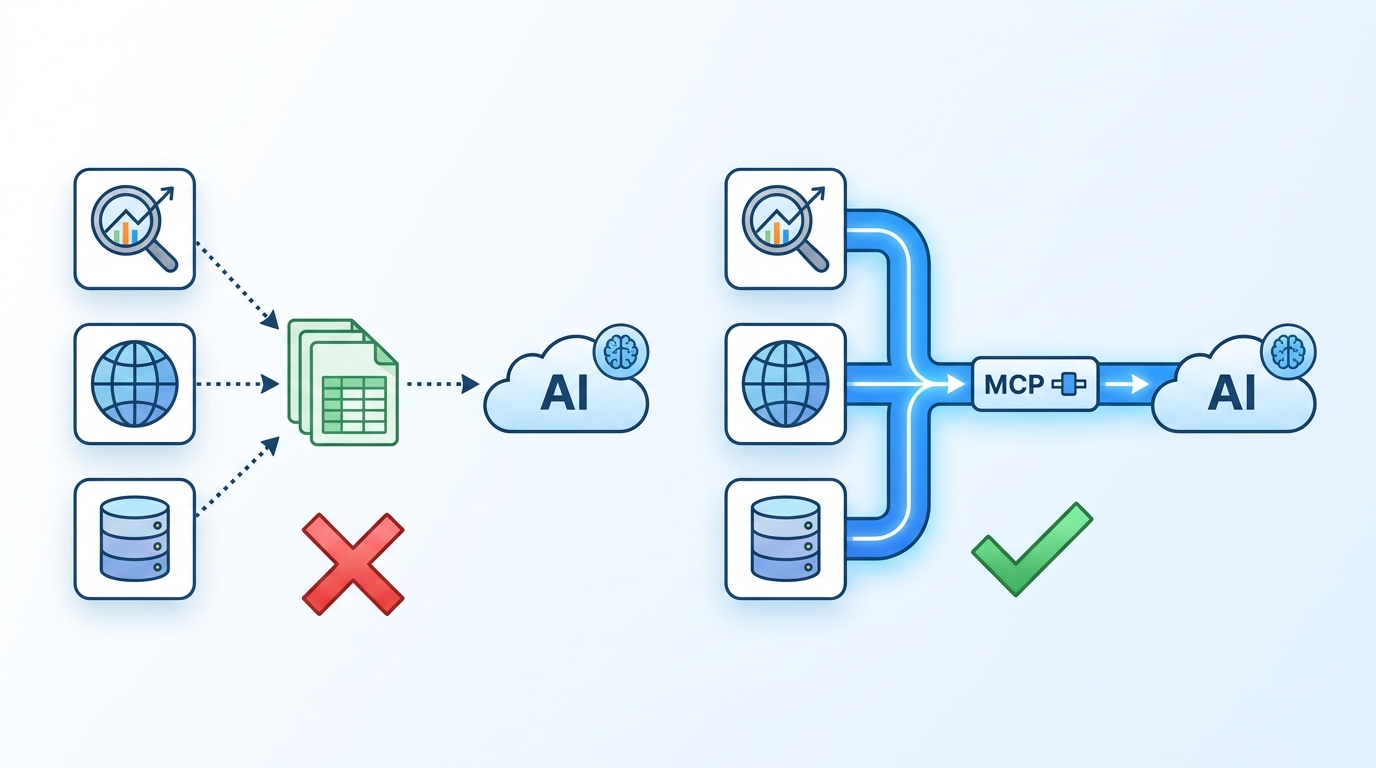 There's a way to eliminate the step of exporting and uploading files: connecting the AI directly to the tools where the data already lives, without going through any spreadsheets. This means the same question that previously required three exports is now answered by consulting the source in real-time.
The technical standard behind this connection is called the Model Context Protocol, or MCP. It's an open protocol, created by Anthropic and launched in November 2024, that standardizes how an AI connects to external tools and data sources. Before MCP, each combination of AI model and tool required a custom-built integration, according to Anthropic's official documentation, which hindered the scalability of any project dependent on multiple sources. With the standardized protocol, a single integration now works with any compatible system. The pace of adoption reflects this: in just over a year, according to WorkOS, MCP went from an Anthropic launch to a standard adopted by major AI providers in the market.
In practice, for SEO professionals, this changes the workflow from start to finish. Instead of asking "here's my spreadsheet, what do you see," the question becomes "look at the Search Console for this property and tell me what's happening now." The answer arrives without an intermediate step, and the same applies to follow-up questions: the context remains connected, so the second and third questions don't require re-exporting anything.
A Way to Eliminate This Manual Work
Now that the value of both the manual and connected workflows is clear, it's worth naming where this materializes into a product: Draivv Rank was created precisely to bridge this gap between analysis and action. It's Draivv's SEO and GEO CMS, with a native connector that allows you to query client data directly within the conversation, without leaving the chat or preparing any spreadsheets beforehand.
Anyone who has tested the manual workflow described in this article knows how much time is lost reorganizing exports. The Draivv Rank connector eliminates precisely this step: performance, content, and structure data for each site are available for direct query, and an analysis that previously took an afternoon of spreadsheet work now takes a single question.
If your SEO operation still relies on exporting CSVs every time a question changes, it's worth exploring Draivv's B2B SEO: search research, technical foundation and content, with rankings, traffic and leads measured per page.
How to Apply This to Your SEO Routine
The manual workflow already offers real gains and can start today, without any integration: organize your exports, structure the initial prompt to maintain context, and use the ready-made prompts from this article as a starting point. When the volume of analysis grows to the point where the export and upload cycle becomes a bottleneck, the connected workflow via MCP is the natural next step, whether by building the integration internally or by using a tool that is natively connected, like Draivv Rank.
The right question isn't whether it's worth using AI for SEO. It's at what point in the workflow it stops saving time and becomes an integral part of the operation. Speak with Draivv to understand where your content and SEO operation stands today, and where it could be.